Comprehensive Feature Suite

Built for developers who value visibility & speed

Explore the architectural pillars and modern visual tools designed to make database management faster, clearer, and safer.

Visual SQL Query Builder

1. Visual SQL Query Builder (Interactive Canvas)

Design complex SQL queries visually without writing raw SQL by hand. Table cards allow instant column selection, while interactive JOIN cables automatically detect primary and foreign keys.
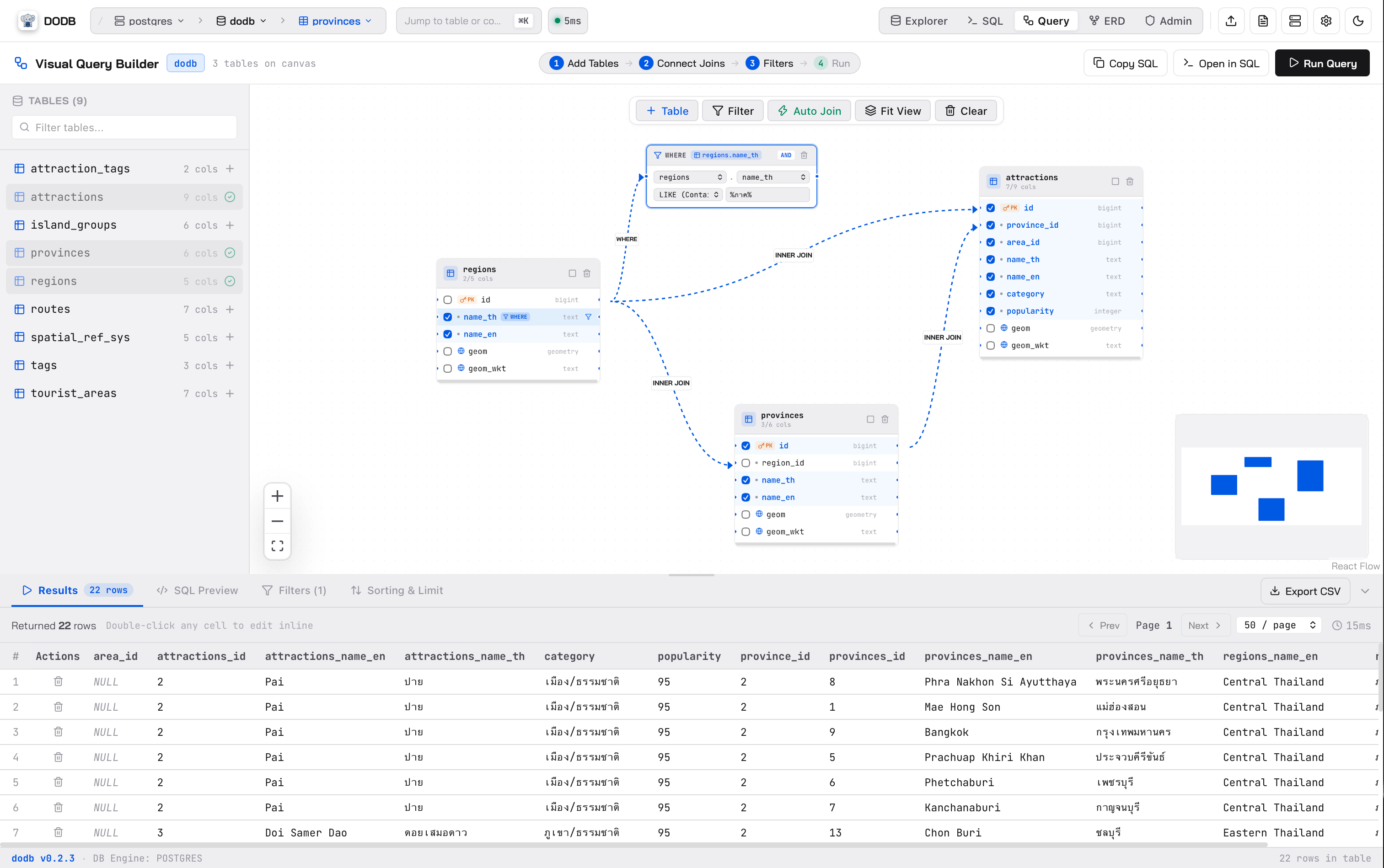
  • Canvas Table Cards — Drag & drop tables onto the canvas, select/deselect columns in SELECT, and inspect data types.
  • Visual JOIN Cables — Connect columns between tables with interactive animated cables supporting INNER, LEFT, RIGHT, and FULL OUTER joins.
  • Smart Auto-Join Detection — Automatically detects matching primary and foreign key constraints to suggest joins.
  • Docked WHERE Filters — Link filter blocks directly to table columns with operators (=, !=, >, <, LIKE, IN, IS NULL).
  • Bi-directional SQL Sync — Generates clean, formatted SQL in real time. Execute directly or send to Monaco Console with 1-click.
1. Visual SQL Query Builder (Interactive Canvas)
Zoom
1. Visual SQL Query Builder (Interactive Canvas)
Spatial Database Explorer

2. GIS & Spatial Data Explorer (MapLibre GL)

First-class support for spatial databases with zero external GIS software required. Inspect geometries on interactive maps with coordinate pickers.
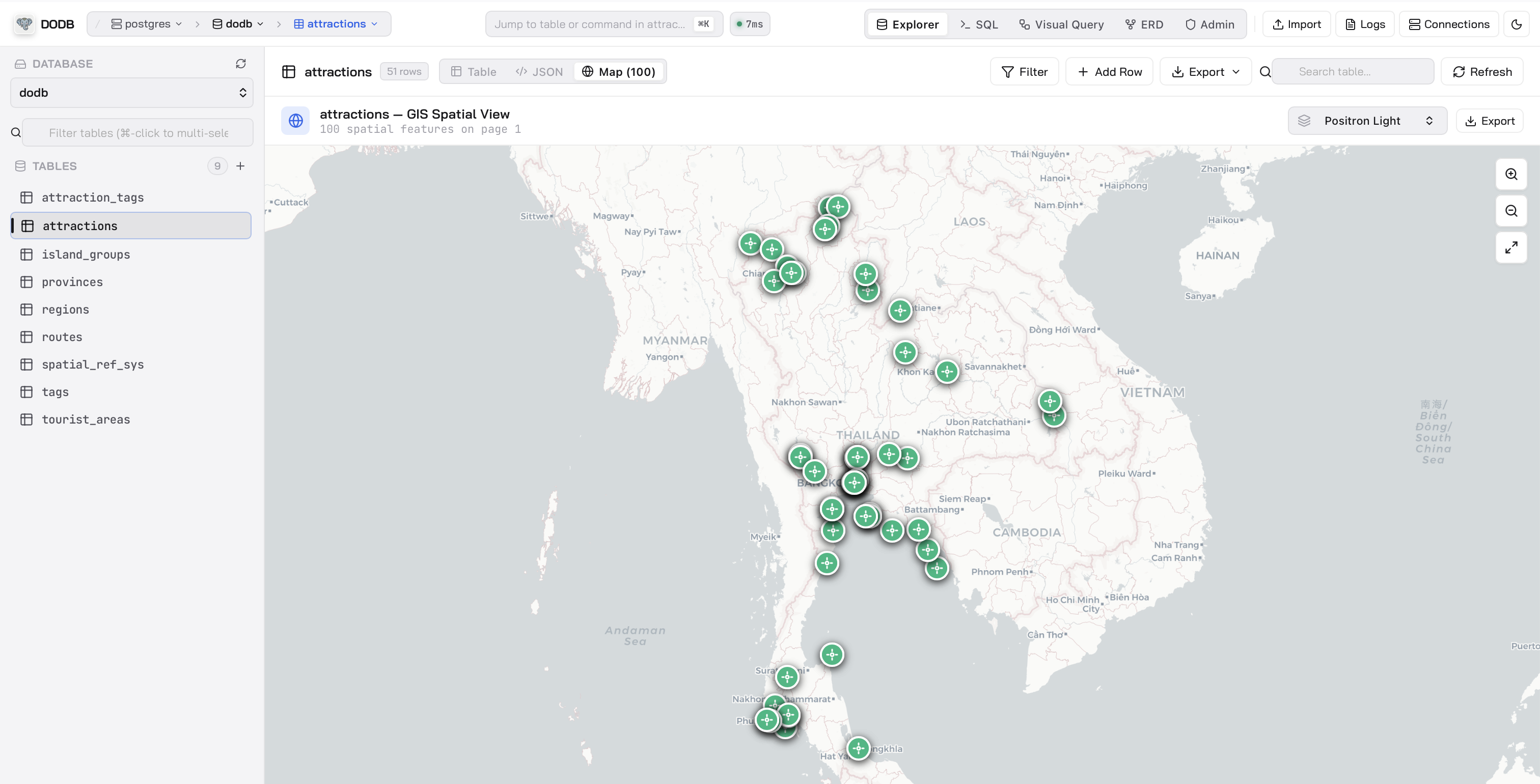
  • Interactive Spatial Map — Render GeoJSON, WKT (Well-Known Text), PostGIS geometries with MapLibre GL.
  • Multi-Layer Visualization — Toggle layers for Points, LineStrings, Polygons, and MultiPolygons with distinct styling.
  • Coordinate Inspector & Radius Queries — Click anywhere on the map to inspect coordinates, measure distances, and construct ST_DWithin spatial queries.
  • Zero Heavy GIS Dependency — No need to open heavy GIS software for quick spatial database checks.
2. GIS & Spatial Data Explorer (MapLibre GL)
Zoom
2. GIS & Spatial Data Explorer (MapLibre GL)
Interactive Schema Canvas

3. Interactive ER Diagrams & Schema Visualizer

Explore database architecture with auto-generated entity relationship diagrams, dependency graphs, and instant column search.
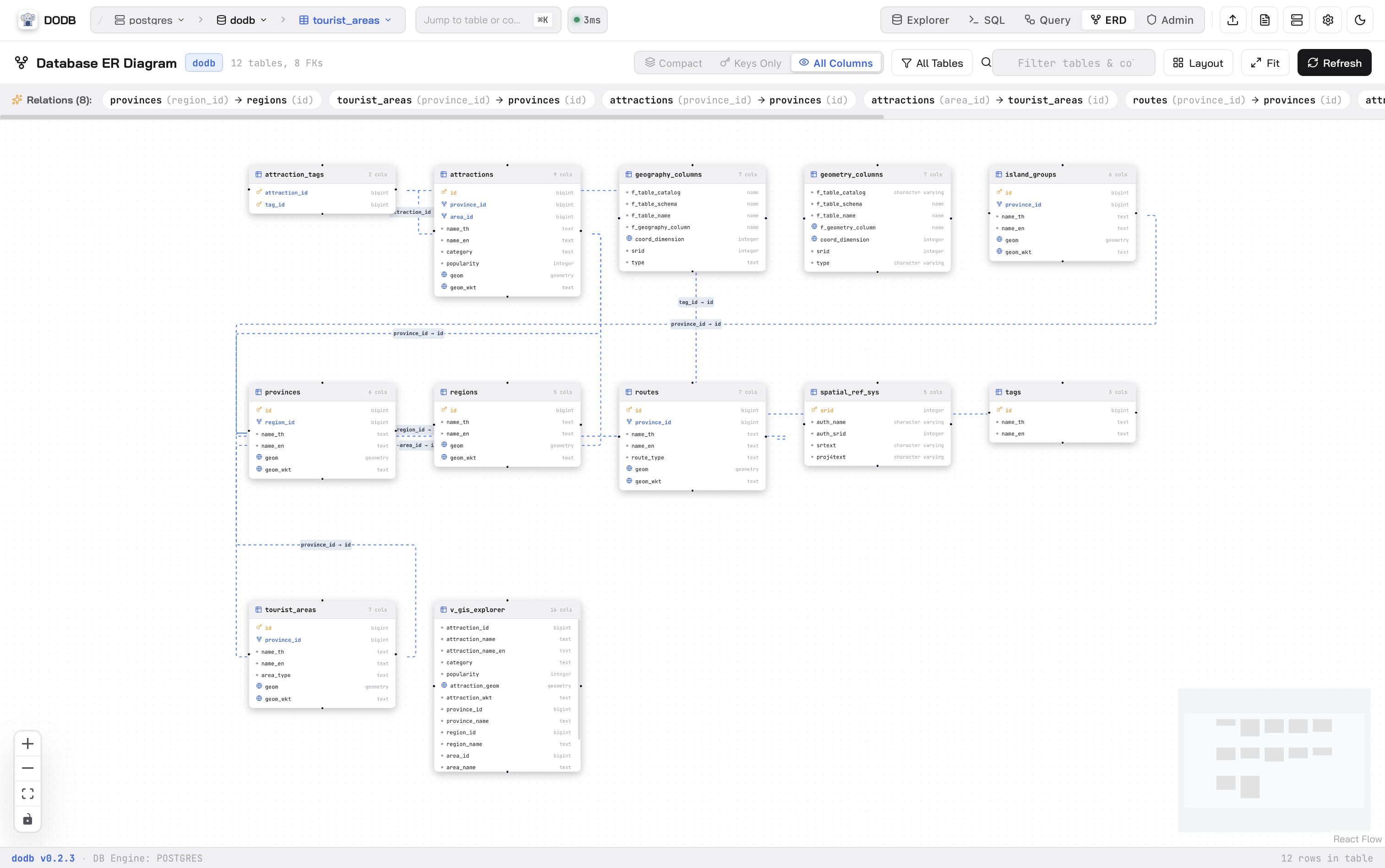
  • Auto-Generated Topology — Automatically parses foreign keys and constraints to draw clean, readable ER diagrams.
  • Interactive Canvas — Zoom, pan, search columns, and trace relationships across complex schemas.
  • MiniMap & Schema Navigation — Easily navigate large databases with tens or hundreds of tables using the canvas minimap.
  • Instant DDL & Schema Export — View generated table DDL and export diagrams for documentation.
3. Interactive ER Diagrams & Schema Visualizer
Zoom
3. Interactive ER Diagrams & Schema Visualizer
Intelligent SQL Editor

4. Full-Featured Monaco SQL Editor

Code with the power of VS Code's editor engine, featuring schema-aware auto-completion, multi-tab execution, and parameterized queries.
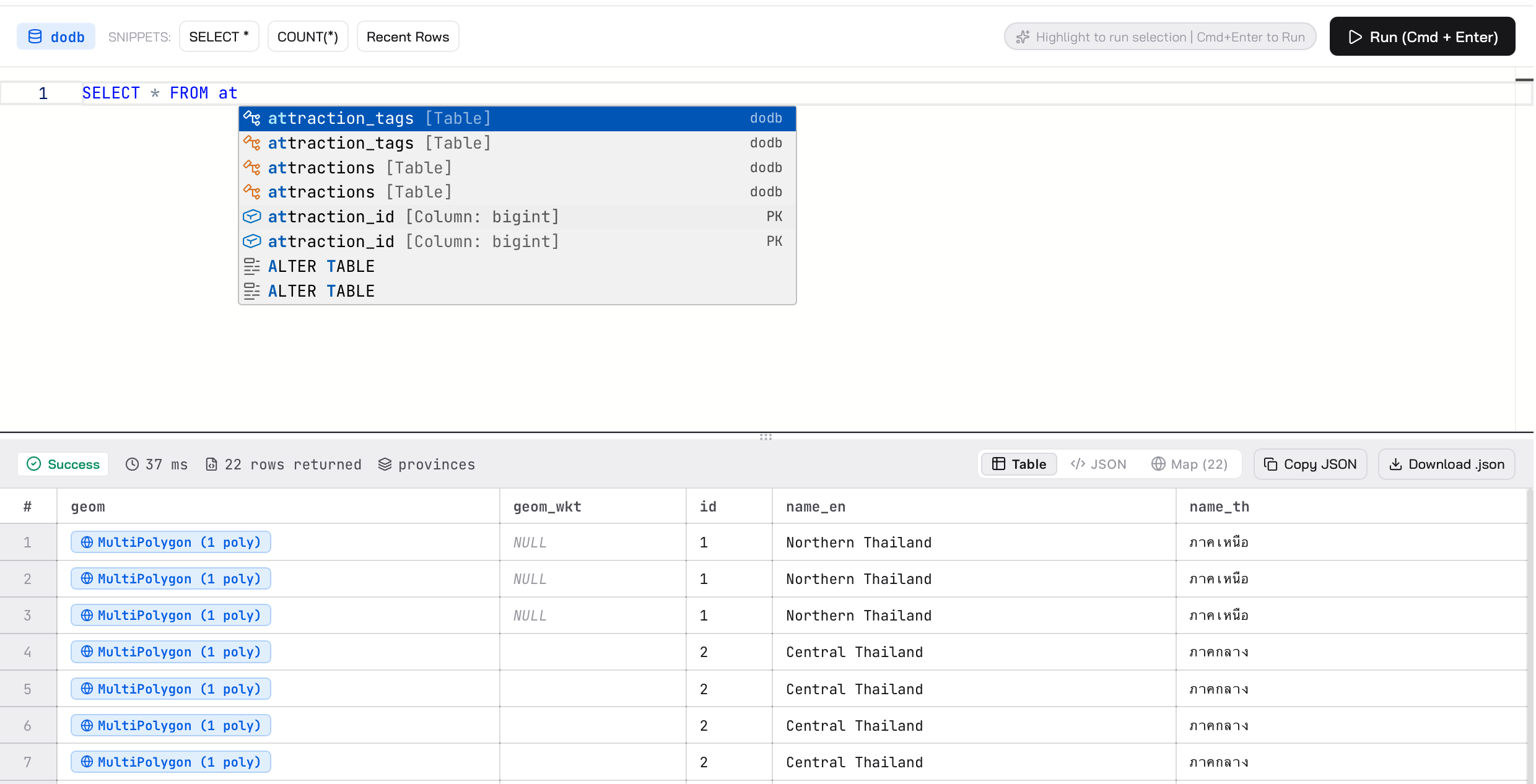
  • VS Code Monaco Engine — Rich syntax highlighting, bracket matching, multi-cursor editing, and code folding.
  • Schema-Aware Autocomplete — Intelligent suggestions for tables, columns, schemas, joins, and SQL keywords.
  • Multi-Tab & History — Keep multiple query tabs open simultaneously with full query execution history and timing metrics.
  • Parameterized Queries — Safe query testing with named parameter inputs.
4. Full-Featured Monaco SQL Editor
Zoom
4. Full-Featured Monaco SQL Editor
Transactional DataGrid

5. Virtual DataGrid & Transactional Staging Bar

Explore and edit database records with 60fps smooth virtual scrolling and atomic transactional safeguards.
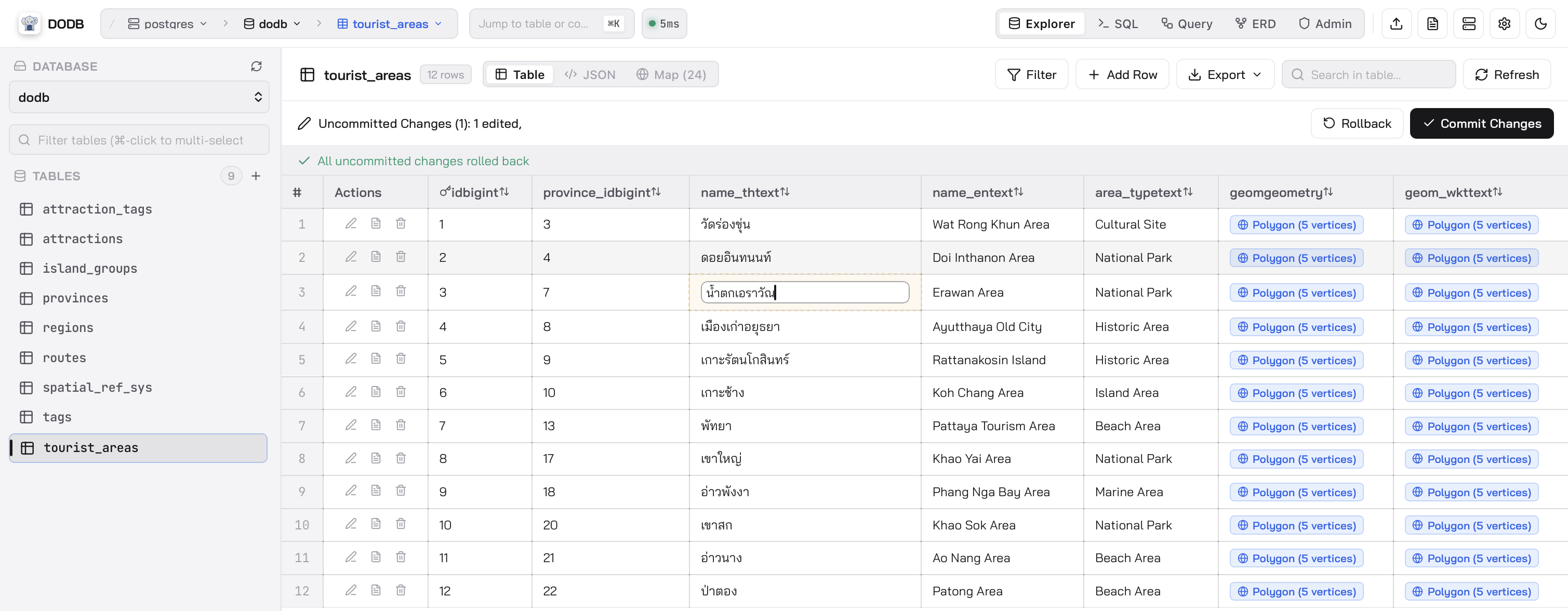
  • Virtual Data Grid — Smooth 60fps scrolling across datasets with tens of thousands of rows.
  • Smart Cell Badges — Visual badges for DateTime, Booleans, JSON, Binary/BLOB, Enums, UUIDs, Primary Keys, and Geometries.
  • Transactional Staging Bar — Review staged mutations (Insert, Update, Delete) with diff review and atomic rollback before committing.
  • Multi-Select & Batch Actions — Select multiple rows with Cmd/Ctrl + Click or Shift + Click for batch deletion or clipboard export.
5. Virtual DataGrid & Transactional Staging Bar
Zoom
5. Virtual DataGrid & Transactional Staging Bar
Record Inspector & Export

6. Detailed Record Inspector & Multi-Format Export

Inspect JSON and deep nested data with formatting, syntax highlighting, and 1-click export.
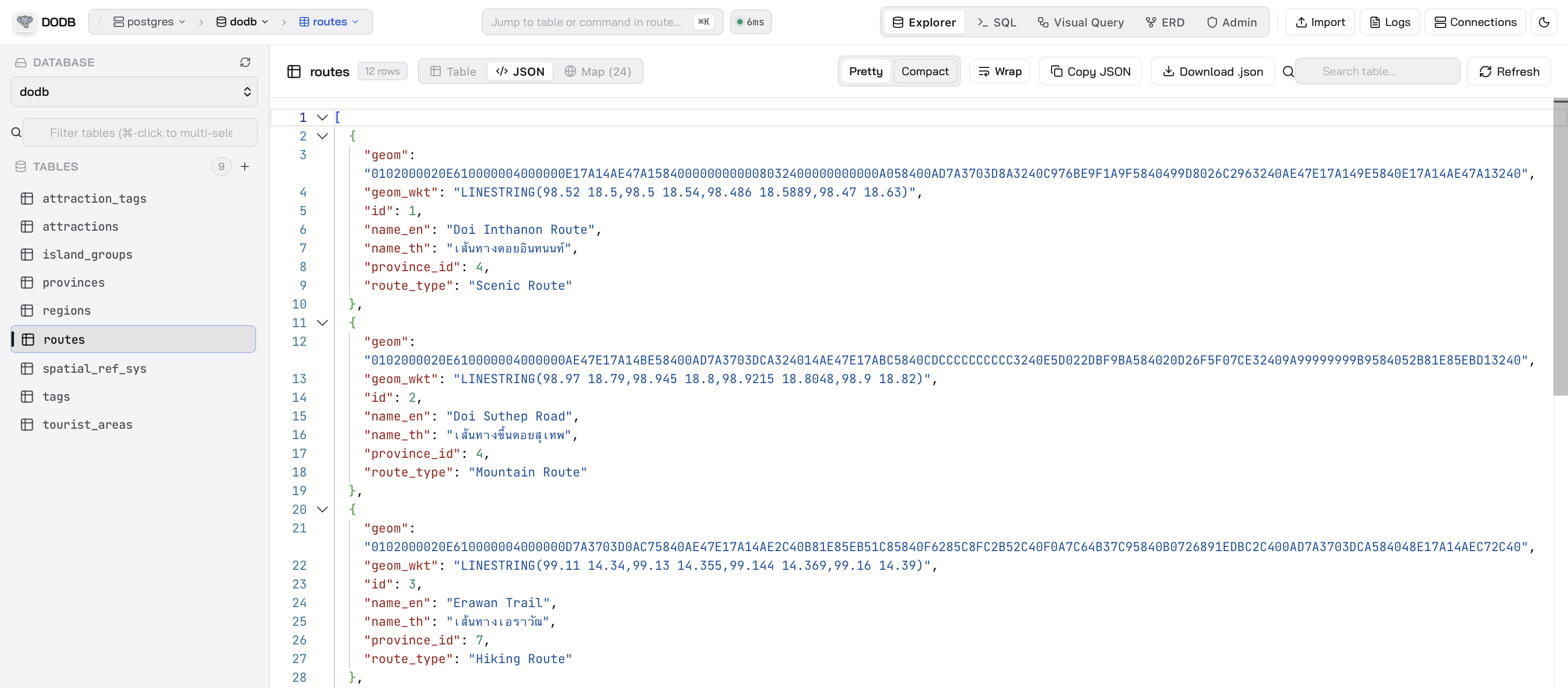
  • Modal Record Inspector — Right-click any row to inspect fields in full-screen modal with instant search and formatted JSON view.
  • Modal Record Editor — Easily edit records with NULL toggles and auto-increment handling.
  • Fast Multi-Format Export — Export queries and tables to JSON, CSV, and standard SQL INSERT statements.
6. Detailed Record Inspector & Multi-Format Export
Zoom
6. Detailed Record Inspector & Multi-Format Export
AES-256-GCM Encryption

7. Connection Profile & Environment Management

Organize database connections with color tags, environment groups, and local hardware encryption.
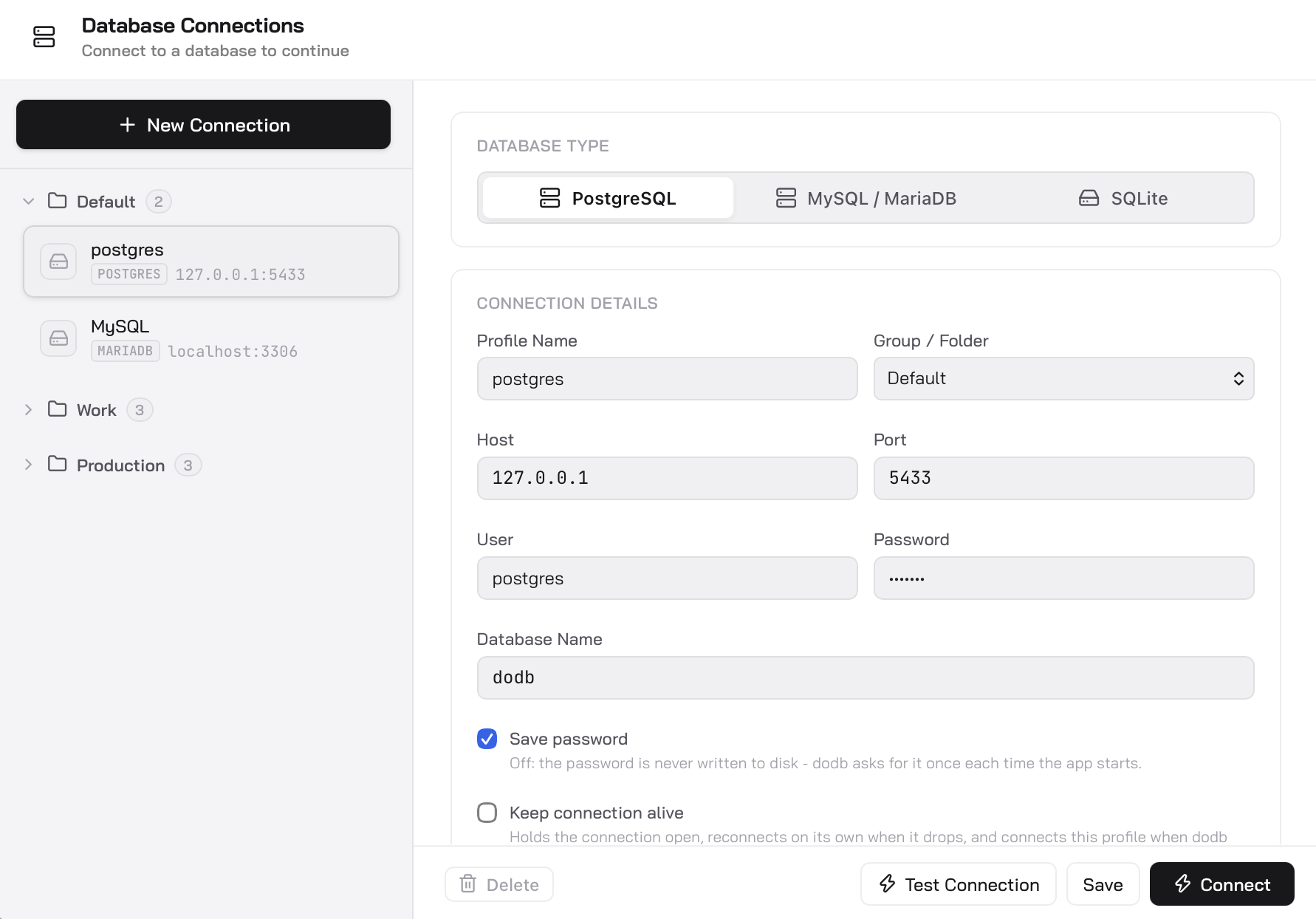
  • Environment Groups & Color Tags — Group connections into Production, Staging, and Local with visual tag colors.
  • AES-256-GCM Local Storage — Encrypted connection credentials stored safely on your machine without cloud sync.
  • SSL / TLS Support — Direct native TLS connections with custom CA and client certificate configuration.
7. Connection Profile & Environment Management
Zoom
7. Connection Profile & Environment Management

Experience dodb in action

Download for free on macOS and Windows or install with one line in your terminal.

© 2026 thutil. Released under the MIT License.

v0.1.0 Built with Astro & Tailwind Github RSS